

Build and Visualize Your Ideal Security Interface with SoldierX AI SIEM
In today’s complex cybersecurity landscape, having a one-size-fits-all interface is no longer sufficient. SoldierX AI SIEM’s Custom Workspaces & Widgets empower you to design personalized, role-specific interfaces with cutting-edge widgets. From drag-and-drop customization to dynamic charts, heatmaps, and real-time data integration, SoldierX AI SIEM ensures your team has the insights they need presented in the most impactful way.
Core Advantages
Key Benefits
Drag-and-Drop Customization
Effortlessly arrange widgets and tailor workspaces to align with your team’s unique workflows.
Dynamic Widgets
Leverage pie charts, bar graphs, line charts, heatmaps, and geospatial maps to transform raw data into actionable insights.
Real-Time Data Integration
Widgets refresh automatically, providing up-to-the-minute visibility into your infrastructure.
Advanced Filtering
Use customizable filters to drill down into specific metrics, IPs, response codes, or time ranges for deeper analysis.
Process Overview
How It Works
Drag-and-Drop Workspace Builder
SoldierX AI SIEM’s intuitive workspace builder allows you to drag and drop widgets onto your canvas. Customize each widget’s size, position, and configuration to suit your preferences. Whether you’re tracking resource usage, incident summaries, or network traffic trends, the flexibility is limitless.
Dynamic Widget Options
SoldierX AI SIEM offers a wide range of widget types to represent your data effectively:
- Pie Charts: Display proportions (e.g., distribution of incident types).
- Bar Graphs: Compare metrics (e.g., server performance across assets).
- Line Charts: Track trends over time (e.g., network traffic spikes).
- Heatmaps: Highlight high-risk areas (e.g., geolocation-based attack origins).
- Geospatial Maps: Visualize attack vectors and malicious IP origins on an interactive map.
These widgets transform raw data into actionable insights, enabling faster decision-making.
Customizable Filters and Drill-Downs
SoldierX AI SIEM supports powerful filter adjustments directly within your active widgets:
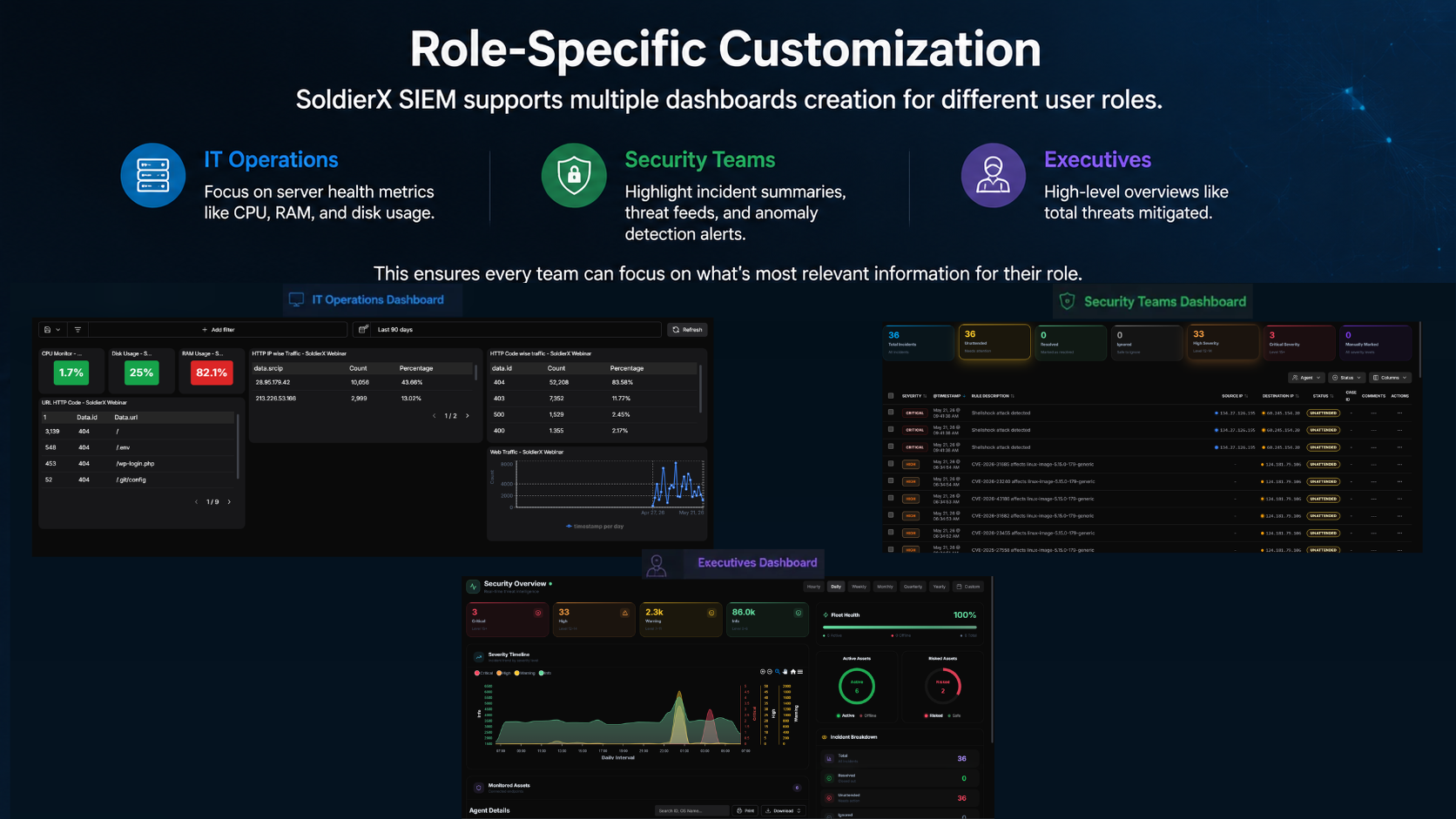
Role-Specific Customization
SoldierX AI SIEM supports multiple workspaces creation for different user roles:
This ensures every team can focus on what’s most relevant information for their role.
Real-Time Data Integration
All widgets are powered by real-time data streams, ensuring your workspaces always reflect the latest activity. From live threat feeds to dynamic traffic trends, SoldierX AI SIEM keeps you informed without delays.
Save and Share Workspaces
Once created, workspaces can be saved for future use or shared with team members. This fosters collaboration and ensures consistency across your organization.
Use Cases
Transform raw data into meaningful workflows with tailored workspaces.
Streamline Team Collaboration
Create role-specific workspaces for IT Ops, Security Analysts, and Executives, ensuring everyone has the information they need to perform their roles effectively.
Monitor Server Health
Use real-time widgets to track CPU, RAM, and disk usage, identifying performance bottlenecks before they impact operations.
Track Incident Trends
Visualize incident data using pie charts and heatmaps to identify recurring issues or emerging threats, enabling proactive mitigation.
Analyze Traffic Patterns
Use line charts and geospatial maps to monitor inbound and outbound traffic, spotting anomalies like DDoS attacks or data exfiltration attempts.
Executive Reporting
Provide high-level summaries for stakeholders, showcasing key metrics like total incidents resolved and risk scores using dynamic widgets.
Why Choose
SoldierX AI SIEM
for Custom Workspaces?
Build workspaces that align with your team’s workflows and priorities, with real-time updates and seamless collaboration. Pair them with AI anomaly detection to spot unusual activity sooner.
Tailored to Your Needs
Build workspaces that align with your team’s workflows and priorities.
Actionable Insights
Dynamic widgets make it easy to interpret complex data and take action.
Scalable for Any Team
Whether you’re a small business or a large enterprise, SoldierX AI SIEM adapts to your needs.
Real-Time Visibility
Stay informed with workspaces that update automatically as new data comes in.
Collaboration-Friendly
Save and share workspaces across teams to ensure everyone stays on the same page.
AI-Powered Detection
Pair your workspaces with AI anomaly detection to surface unusual activity sooner.